Daily Reports — the legal record of a construction day
Designing the missing daily-log module inside Oracle Prime Field, built for the site super at 5:30pm on a Friday and the claims attorney reading it two years later.
- Role
- Senior Product Designer — flow, wireframes, field research, UI
- Year
- 2017 — 2018
- Platform
- iOS, Windows Surface, Web (Oracle Prime / Aconex)
- Industry
- Construction Technology · Field Operations
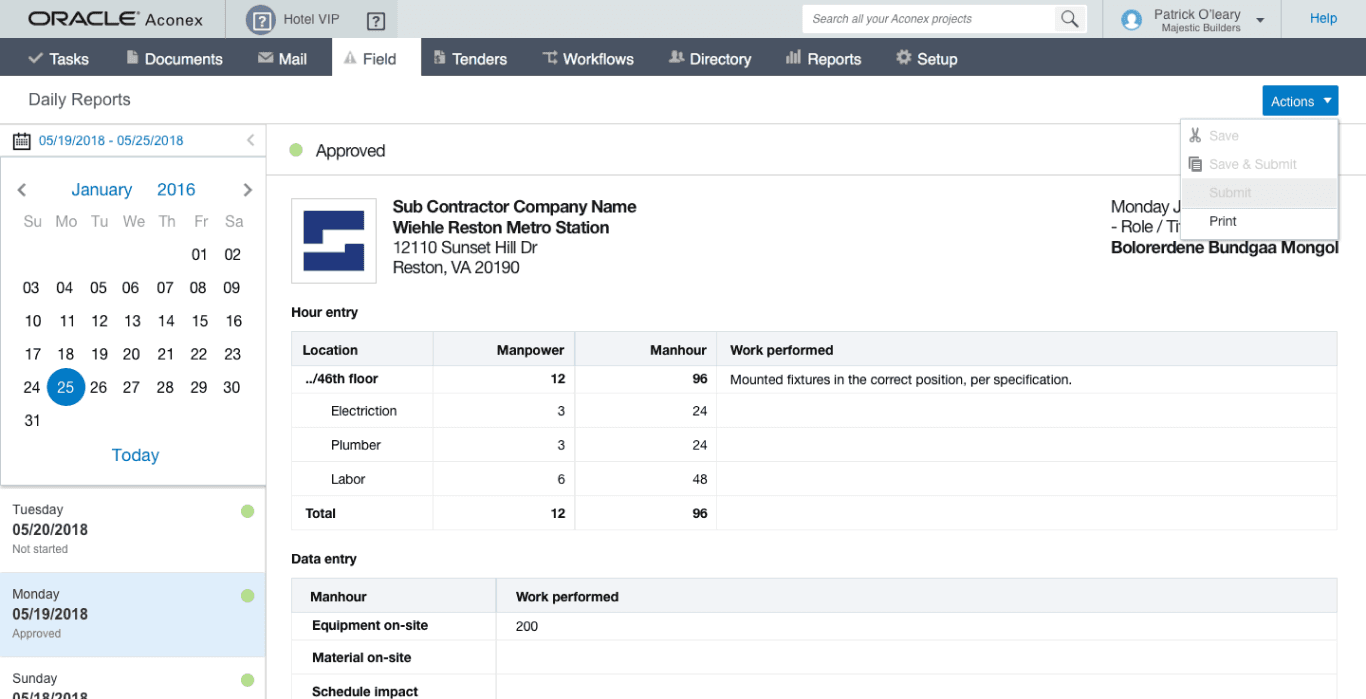
Daily reports are the legal record of a construction day. Latista didn't have them. After Oracle acquired Latista and rebranded it as Oracle Prime Field, that gap became a shipping blocker, so I designed the module. The design had to serve two very different moments: a tired site super filing the report at end-of-day, and a claims attorney reading it two years later to reconstruct a schedule dispute.
In construction, a daily report isn't paperwork. It's the record a lawyer reaches for when there's a schedule dispute, a weather-delay claim, or an injury investigation. Every commercial project produces one per day per contractor. It logs who was on site, what work happened, what the weather was, what got delayed and why. It is boring and it is non-negotiable.
Latista's field suite handled issues, RFIs, and material tracking. It did not handle daily reports. After the Oracle acquisition, that gap stood out because Oracle Prime Field went up against Procore and Textura, both of which had solid daily-log flows.
I was already inside the product from Quick Punch and the Foreman App work. Oracle asked me to design Daily Reports into Prime Field, and by extension into Oracle Aconex, since the two products were converging.
What was broken.
The design problem sounds easy: give the super a form. It isn't.
The super files the report at end-of-day. That's 5pm on a good day and 7pm on a bad one. They are tired, they are rushing, and they have already been through a lunch meeting, a sub coordination call, and possibly a safety incident. Anything that takes more than five minutes will get skipped, and a skipped day breaks the legal record.
Meanwhile the report has to capture enough that two years later a claims attorney can reconstruct what happened. Weather, crews on site, hours worked, work performed, delays, equipment, safety incidents, deliveries. That is a lot of fields for a five-minute form.
Same underlying problem as Quick Punch: keep the field flow short and the office record complete, without one starving the other.
Workflow first — end-of-day is a specific human moment
I stopped treating the daily report as a form and started treating it as a moment in the super's day. That moment is 5:30pm on a Friday, in a trailer, with a phone ringing. The design has to survive it. Everything downstream (the archive, the search, the legal reconstruction) depends on whether the super hits submit.
So I mapped the day rather than the fields. Who touches this record and when? The super at 5:30pm, the PM the next morning, and a claims attorney two years later. Three actors, three needs, one record.
- 01
Morning — auto-open a pre-filled draft
The system opens a draft with today's date, the site, and yesterday's crews carried forward. Weather is pulled from a location-based API. The super hasn't touched anything yet.
System - 02
Midday — quick updates as things happen
The super logs a weather delay or a safety incident from the field, one entry at a time. Each entry auto-attaches to today's draft with a timestamp. There is no explicit save step.
Site Superintendent - 03
5pm — end-of-day review
The super opens the draft. Weather is already there. Crews were carried forward from yesterday with a one-tap adjustment for who was on site today. Earlier entries stack in a timeline. All that's left is 'work performed' and 'notes.'
Site Superintendent - 04
Photo attach and submit
A one-tap add for progress photos from the day, and a submit action that locks the record. From that point it is an immutable legal document. Edits are logged as amendments, not overwrites.
Site Superintendent - 05
PM review the next morning
The PM sees new reports queued in their inbox. They can add commentary but cannot overwrite the record. Anything ambiguous gets a comment thread pinned to it.
Project Manager - 06
Archive and retrieval
Reports flow into the project archive, searchable by date range, keyword, crew, weather, and delay reason. Two years later a claims team can pull seven weeks of reports in a single query.
System + Claims Team
From tangled to shipped.
Sat with supers at 5pm for a week
I sat in trailers at end-of-day and watched real supers file paper reports. Two things stood out. First, roughly half of what they wrote down was unchanged from yesterday: same crews, same equipment, mostly the same weather. Second, the fields they cared about most were often not on the form at all. They were writing them into the margin: a note about a subcontractor no-show, a comment about a delivery delay, a description of a near-miss. The system was fighting the record.
Let the system do 60% of the report before the super opens it
Weather is a public API. Crews carry forward from yesterday with a review step. Equipment on site pulls from the material-tracking module. Deliveries live on the schedule. That is roughly 60% of the report already filled in before the super touches it. What's left is what only they can know: work performed, notes, and incidents.
Turned midday events into an auto-building draft
Rather than making the super remember everything at 5pm, the design lets them log events during the day (a weather delay at 2pm, a safety huddle at 3pm) and each entry auto-attaches to today's draft. By 5pm the draft is already about 80% built. The review became a five-minute task rather than a thirty-minute one.
Sketch prototype, in the hands of two supers for a week
I wireframed the flow in Sketch, prototyped the interaction, and put it in the hands of two site supers for a week: real weather, real crews, real reports. Their feedback drove the biggest change: a scrollable, pinnable timeline so a super could bookmark a critical event and find it fast during the end-of-day review.
The moves that worked.
A draft that auto-opens every morning
Weather pulled, crews carried forward, equipment pre-filled from the material module. The super's first interaction is a review rather than a blank form.
A timeline of the day rather than a form
Events log throughout the day (weather delays, safety huddles, deliveries, near-misses) and each one timestamps and pins itself to today's draft.
A five-minute end-of-day review
By 5pm most of the report is already built. The super fills in work performed and notes, drops a couple of progress photos, and submits.
Immutable after submit
Once submitted, the record is legally locked. Edits become amendments with author, timestamp, and reason attached. That is what turns the tool from a checkbox into a legal record.
Search a claims team can actually use
Two years later, a claims lawyer can query by date range, weather, crew, or delay reason and get a filtered set of reports back in seconds. That query is the reason daily reports exist.
Screens and scraps.

What shipped. What changed.
What shipped: a Daily Reports module inside Oracle Prime Field, and by convergence Oracle Aconex, covering the morning-through-archive flow. Supers filed complete reports in the time it took to make a coffee. PMs got a clean inbox the next morning. The claims team got a searchable archive that didn't require pulling boxes of paper.
I don't have public adoption numbers from Oracle to cite. Enterprise B2B metrics rarely leave the account team. What I can say: the design matched the workflow the field actually runs on, and it stopped the platform from losing deals to Procore over a missing table-stakes feature.
“The habit I would repeat: sitting in the trailer at 5pm. You cannot design end-of-day flows from a whiteboard, because you cannot imagine tired. The one thing I would change: I under-invested in the amendment flow. Once a report is submitted, edits are legally significant, and I treated the amendment UI as an afterthought. Next time I would put the same design weight on "how do you correct yesterday's report" as I did on "how do you file today's." Legal records deserve that.”
Pulse IQ
A smart-building ops dashboard I designed and coded through six rewrites, a Fire TV port, and an Angular migration.