Centene Insurance Appeals
Designing a digital appeals module for Indiana Medicaid providers, built on top of four back-office systems and four roles.
- Role
- Senior Product Designer (via 3PillarGlobal) — workflow design, service blueprinting, wireframes, hi-fi Figma prototype, cross-system integration design
- Year
- 2020
- Platform
- Web (Provider Portal), Figma, Sketch, Miro, Jira
- Industry
- Healthcare / Insurance (Medicaid Managed Care)
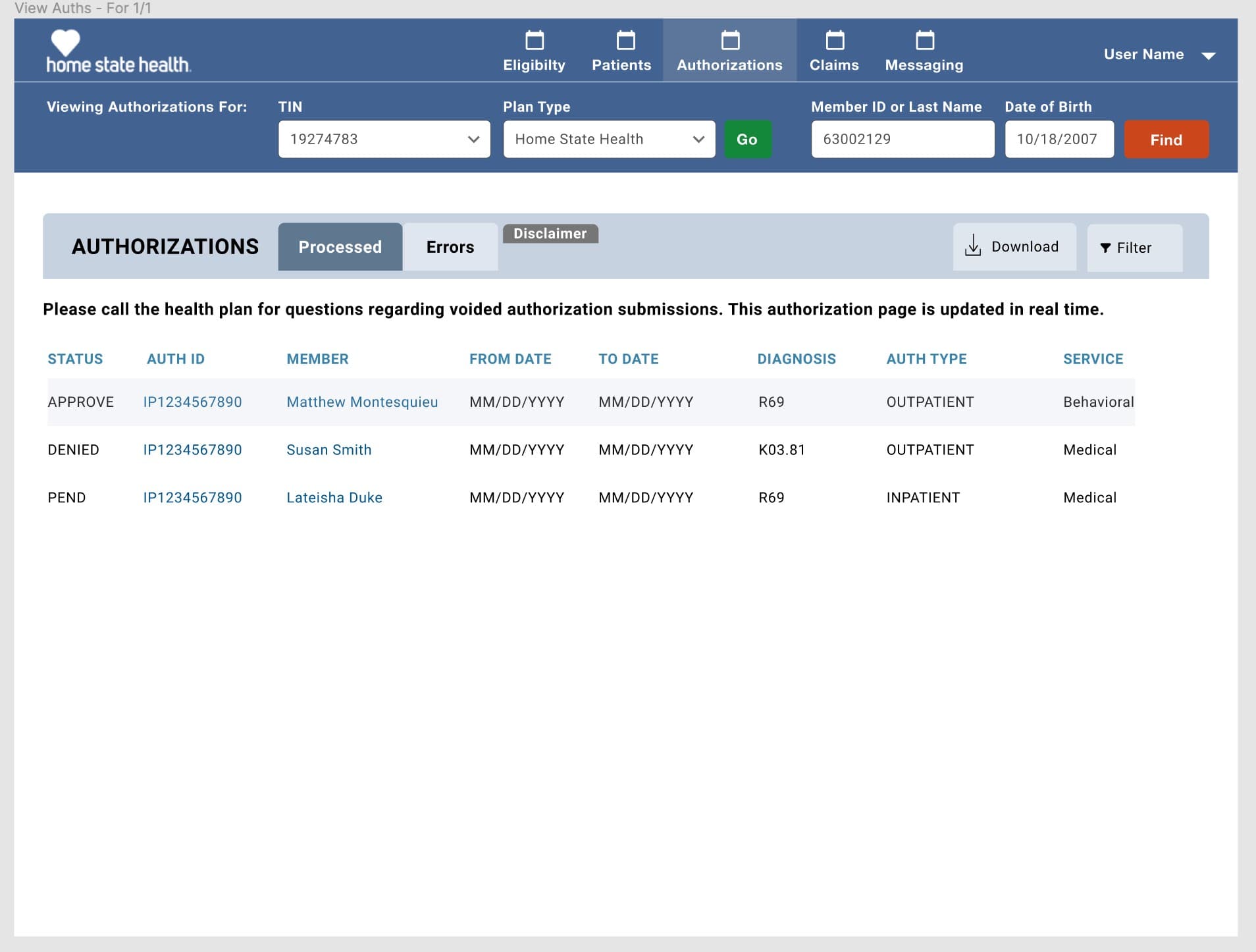
Centene's Indiana Medicaid plan (Home State Health) ran provider appeals against denied prior authorizations as a paper process that took ten to fourteen days. I designed the digital Appeals and Complaints module inside their Provider Portal. Before I drew any screens, I mapped a workflow that crossed four back-office systems (Provider Portal, Prime, TruCare, MCG) and four roles. Providers ended up with a submission and tracking view tied to real system state. Coordinators got a queue in place of a fax tray. Appeals stayed consistent across every system that touched them.
Centene is a Fortune 25 healthcare company. This project was for their Indiana Medicaid plan, operated as Managed Health Services / Home State Health. 3PillarGlobal brought me in as one of Centene's design vendors to work alongside their internal Consumer & Customer Experience Design (CCXD) team on the Appeals and Complaints workstream inside the Provider Portal.
The stakes here are real. When a provider gets a prior authorization denied, they have a legal right to appeal. At the time, that appeal came in on paper or through EDI, then an internal "IN Coordinator" team worked it over ten to fourteen days: scanning documents, creating folders in shared drives, routing to medical reviewers, generating decision letters, and updating a tracker spreadsheet. Every one of those touches was a place the SLA could slip. Medicaid appeals have hard regulatory deadlines, and missing one isn't a poor experience, it's a compliance violation.
The ask sounded simple: give providers a way to file, track, and manage appeals inside the existing Provider Portal. In practice, that meant designing a workflow that touched four systems (Provider Portal, Prime, TruCare, MCG), four roles (Provider, IN Coordinator, Associate Medical Reviewer or Medical Director, Member), and a parallel complaints and grievances flow — inside a regulated healthcare product where the wrong status at the wrong time creates a legal problem.
What was broken.
The legacy process was fourteen days of manual coordinator work per appeal, and none of it was visible to the provider who filed it. A physician's office would fax or EDI an appeal against a denied prior authorization and then call weeks later trying to find out where it landed. Meanwhile the coordinator team scanned paper, made folders, researched type and timeframe, sent acknowledgment letters, built appeal summaries, routed to an Associate Medical Reviewer or Medical Director, chased status, sent decision letters, and updated a tracker. All of it lived in spreadsheets, email, and PDFs. One dropped step and the SLA slipped, and the department mandate was clear: no appeal past fourteen days.
The digital problem was harder than it looked. An appeal isn't a form. It's an object that lives across four systems. The Provider Portal is where the provider sees it. Prime is the appeals workflow engine that owns the record. TruCare is the system of record for the underlying authorization (patient, diagnosis codes, service, dates). MCG holds the clinical guidelines the medical director uses to adjudicate. If the appeal's status wasn't consistent across those four systems at every moment, we would create race conditions on regulated healthcare data. That is a compliance problem before it is a design problem.
And the people using this aren't power users. On the provider side there are medical office admins pushing through more than forty patients a day. On the payer side there are coordinators juggling dozens of open appeals with a five-business-day clock on the clinical reviewer step. Behind all of it is a member (often a Medicaid patient who was denied care and is waiting to hear whether they'll get it). That is why I refused to treat this like a generic CRUD workflow.
Workflow first, screens second
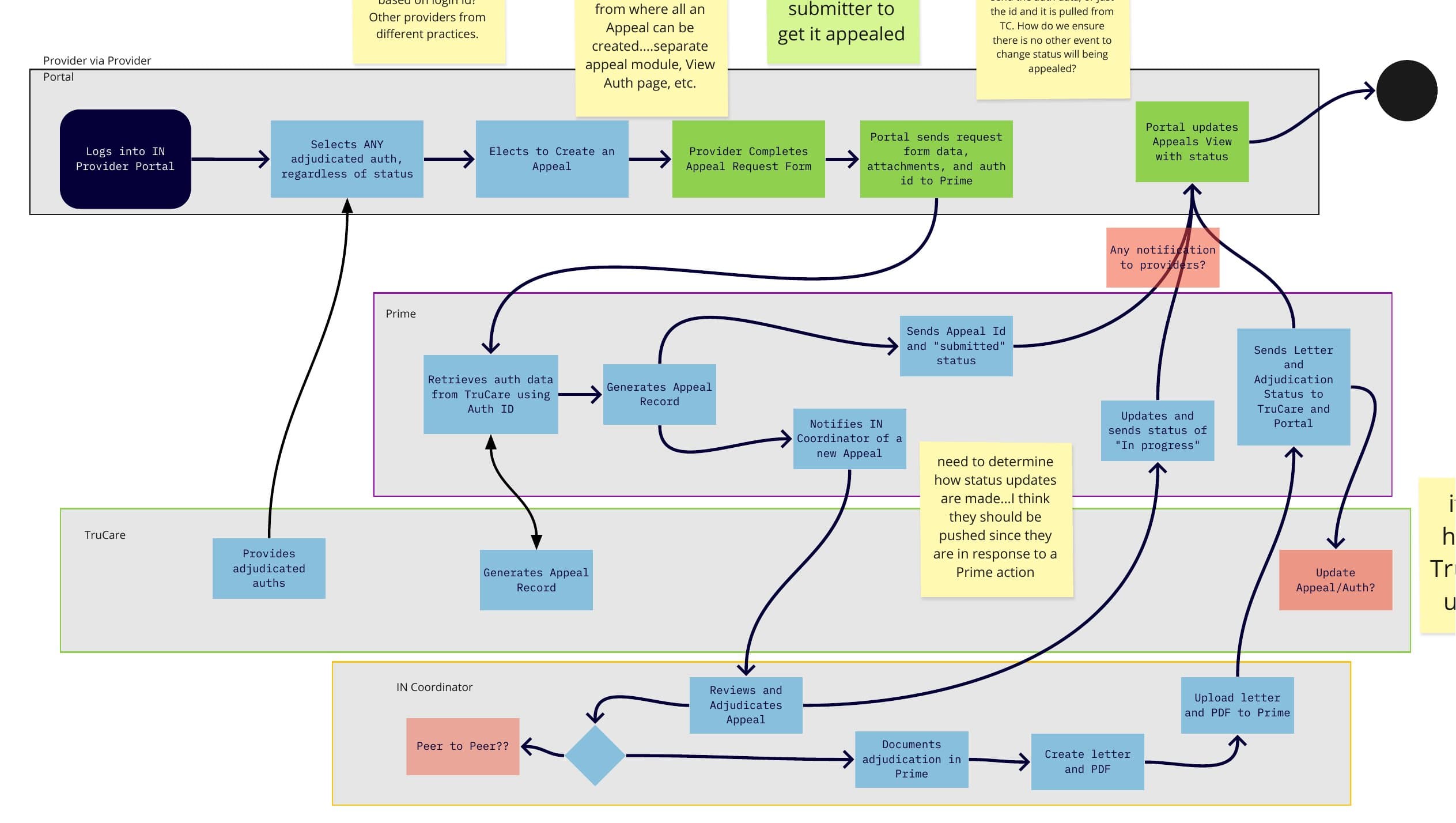
I don't draw screens for workflow products until the workflow itself is mapped. On this one the workflow crossed four systems and four roles, with a hard fourteen-day regulatory clock and a five-business-day clinical review sub-clock inside it. Below is the flow we designed to, end to end. Every step has a system of record, an actor, and a status transition. On a healthcare product, an ambiguous state is a compliance issue.
- 1
Find the adjudicated authorization
The provider logs into the Home State Health Provider Portal and opens the Authorizations tab. They find the adjudicated auth they want to contest (approved, denied, or pended) and click APPEAL right on that row. The appeal starts in the context of a specific auth, not from a separate module.
Provider (physician office admin) - 2
Complete the appeal form
The appeal form opens with patient info, diagnosis codes, service, date range, and Auth ID already populated from TruCare. The provider fills in the clinical reasoning and uploads supporting documentation. If the system already knows a field, it fills it in.
Provider Portal + TruCare - 3
Submit to Prime, receive Appeal ID
The Portal sends the form, attachments, and auth reference to Prime. Prime creates the Appeal Record, generates an Appeal ID, and returns 'Submitted' status. That is the moment the appeal exists as an object of record. Before this, it is a form draft.
Provider Portal → Prime - 4
Coordinator triage and routing
Prime notifies the IN Coordinator queue. A coordinator picks up the new appeal, reviews the submission and attachments, and decides routing: direct adjudication, peer-to-peer conversation, or clinical review by AMR or Medical Director. Status pushes back to the Portal as 'Pending' or 'Need RFI' if more information is required.
Prime → IN Coordinator - 5
Clinical review against MCG guidelines
If it is routed for clinical review, the AMR or Medical Director gets the case with a five-business-day SLA. They review the clinical documentation against MCG evidence-based guidelines (integrated directly, not through EDI) and log the adjudication in Prime.
Associate Medical Reviewer / Medical Director + MCG - 6
Decision letter and status resolution
The coordinator generates the decision letter (uphold, overturn, partial) and uploads the PDF to Prime. Prime pushes the final status and letter back to TruCare (which updates the underlying auth) and to the Provider Portal (which surfaces it to the provider).
IN Coordinator + Prime - 7
Provider sees resolution, member is notified
The provider sees the resolved status in their Appeals tab with the decision letter attached. The underlying authorization in TruCare reflects the outcome. The member gets notified through the standard notification pipeline. The appeal object stays queryable, and the frozen auth details from the time of appeal remain visible alongside the current state.
Provider (+ Member notification downstream)
From tangled to shipped.
Read the legacy process before drawing anything
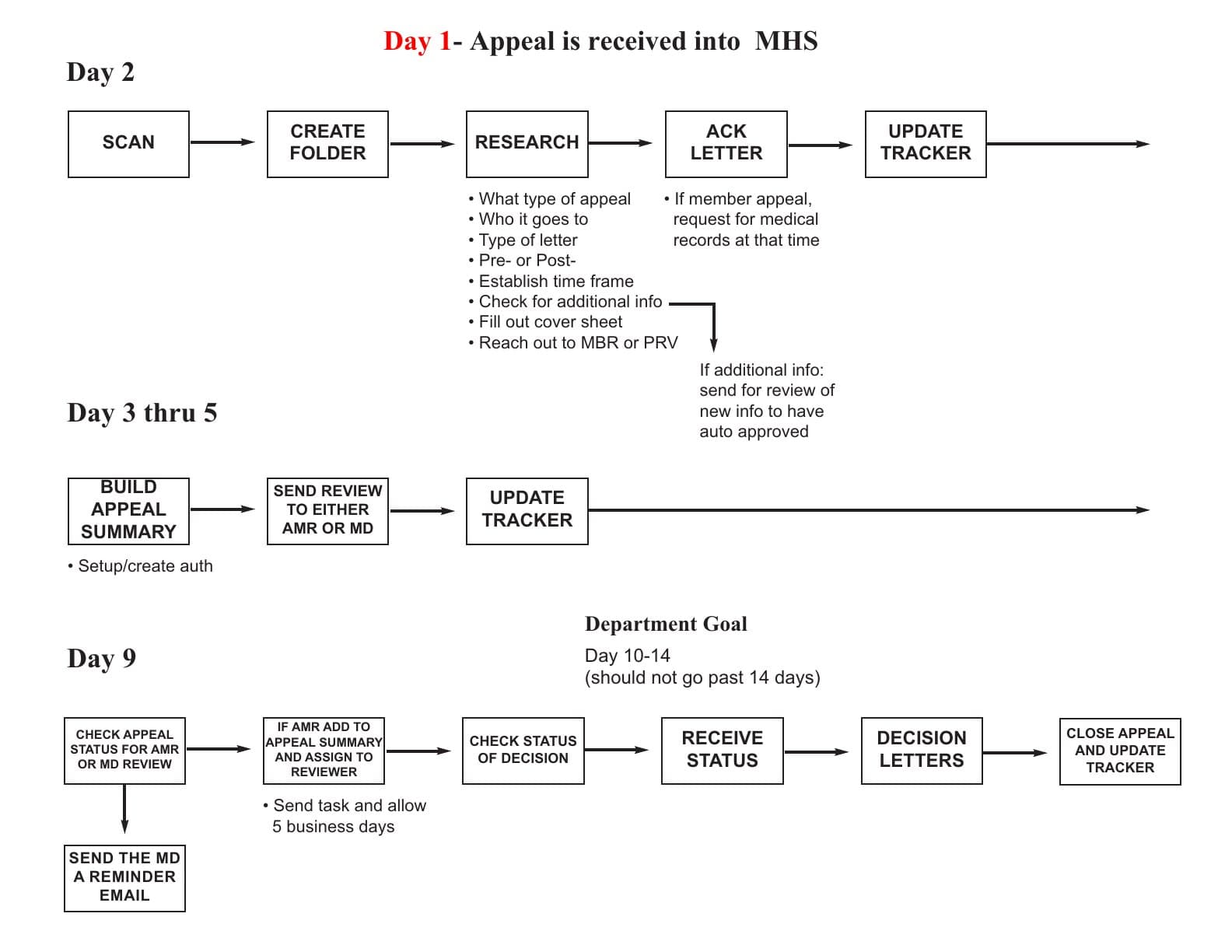
Before I opened Sketch I asked to sit in on the coordinator team's real workflow. That is where I got the fourteen-day process diagram: Day 1 (appeal received), Day 2 (scan, create folder, research, ack letter), Days 3 to 5 (build summary, route to AMR or MD), Day 9 (send reminder), Days 10 to 14 (decision, close). I redrew it as a swim lane so we could see which steps a digital product could remove versus which ones a human still had to do. About half were manual chores that only existed because intake was paper. Those were the first ones to go.
Map the system boundaries
Appeals live in Prime. Authorizations live in TruCare. Clinical guidelines live in MCG. The Provider Portal is the window. I spent a week with Centene engineering figuring out which system owned which field, when status transitions happened, and which direction data flowed. The important call: statuses would be pushed from Prime to the Portal rather than polled. Polling would create race conditions if a coordinator adjudicated an appeal at the same moment the provider hit refresh. You can't figure that out from a screen. You figure it out from the workflow.
Walk the workflow for every role
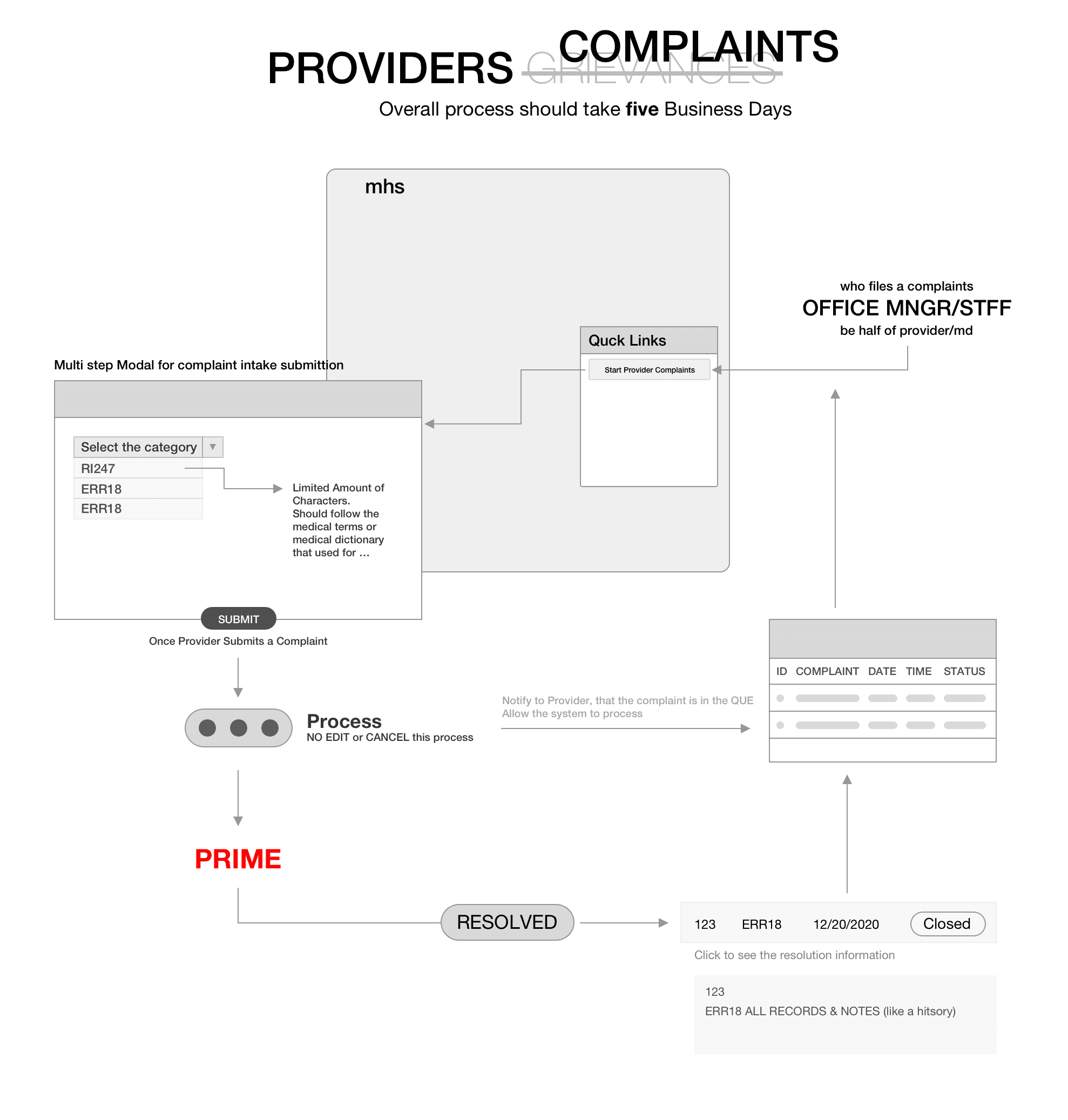
Once the flow was clear I ran through it with all four actors (Provider, IN Coordinator, AMR / Medical Director, Member) and asked what each one needed to see and do at every step. That is when the parallel complaints and grievances workstream broke out on its own. A complaint doesn't have an auth attached, so it can't ride the same intake as an appeal. Same portal, different object, different entry point. Cramming them into one form would have made both worse.
Wireframe, then prototype
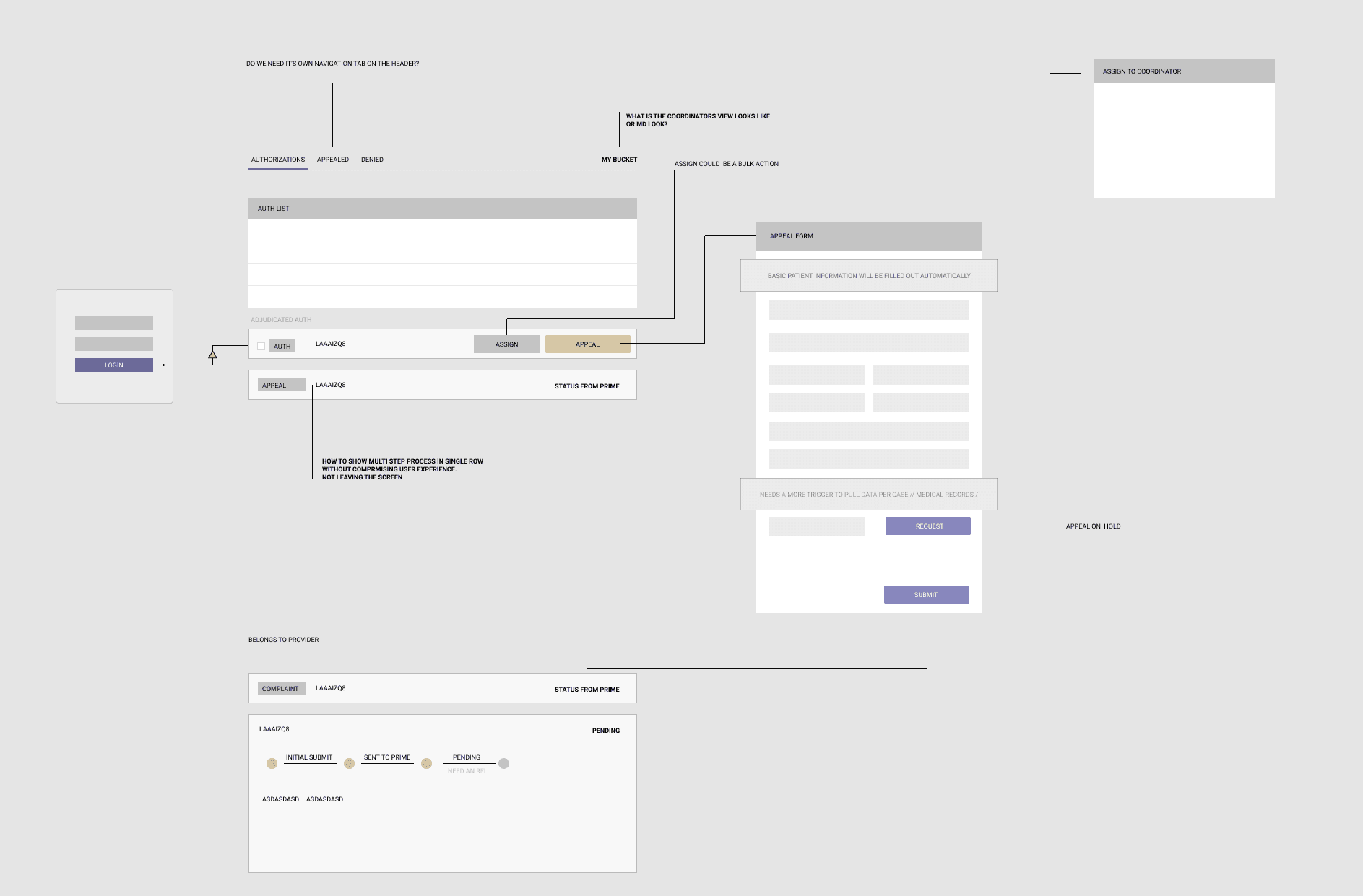
Only after the workflow was mapped did I touch screens. The first round was mid-fidelity wireframes: the new Appeals tab, the adjudicated-auth row with the APPEAL action, the appeal form with patient info auto-filled from TruCare, the status stepper, and the coordinator's assignment panel. I reviewed these with Gary Wu and the CCXD team on Miro and Google Meet through November and early December 2020, iterating on things like where the RFI (request-for-information) state belonged in the stepper and whether "appeal" and "reconsideration" needed distinct entry points. They did.
Hi-fi on the existing design system
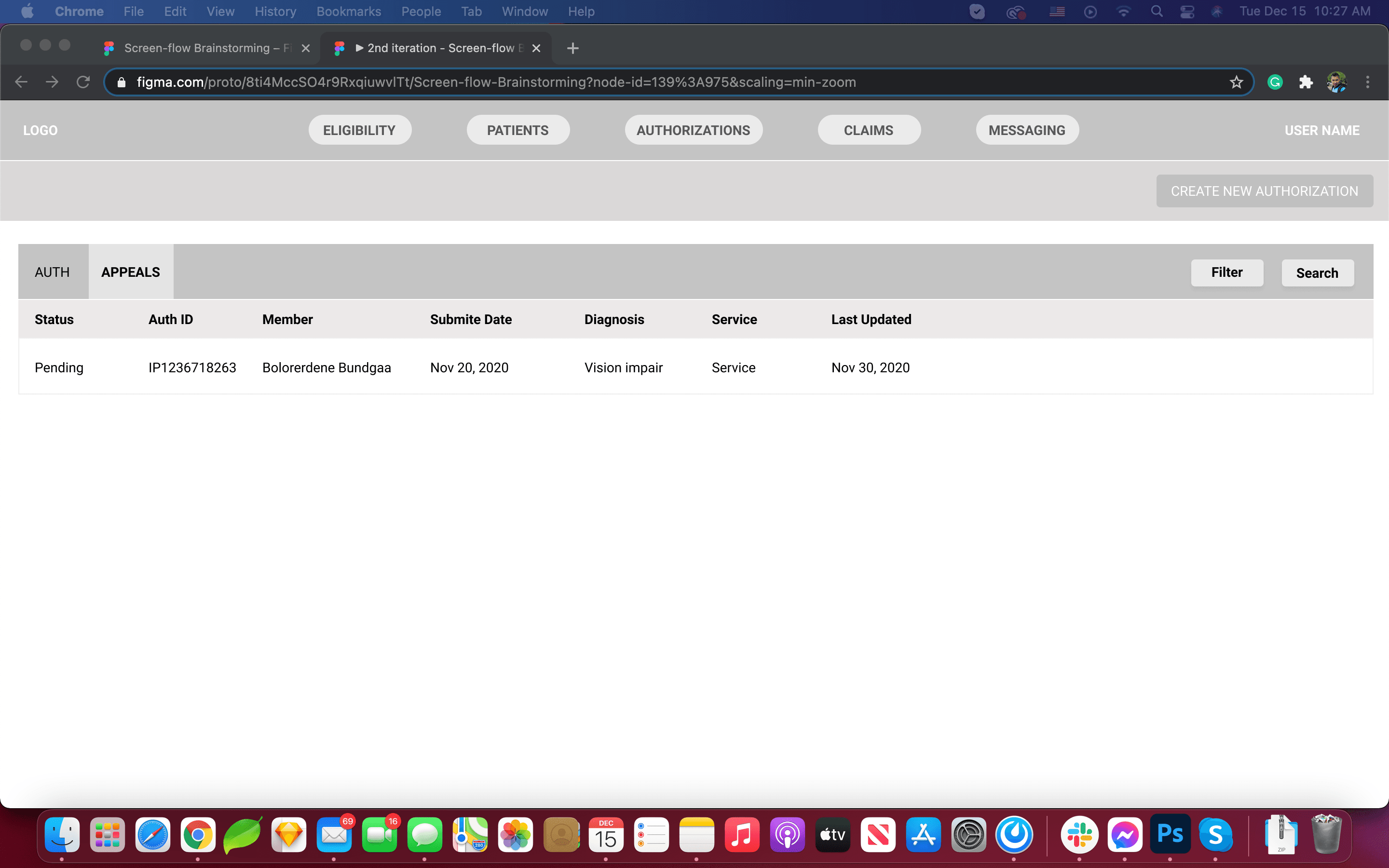
The second Figma pass moved onto the Home State Health design system so the module sat visually next to the existing Authorizations, Claims, and Eligibility tabs providers already used. That mattered. I didn't want the appeals experience to feel like a bolted-on module. It needed to feel like it was always there.
The moves that worked.
The appeal starts where the denial lives
Rather than a standalone "Appeals" section, I put the appeal action on any adjudicated authorization row (approved, denied, or pended). That matches how providers already think: they're looking at a specific auth for a specific patient, and they want to contest it. Making them navigate to a separate module would break that context. The APPEAL button sits next to the row it belongs to.
Auto-populate everything the system already knows
The appeal form pulls patient info, diagnosis codes, service, and date ranges directly from TruCare via the Auth ID. The provider fills in what only they can know: the clinical reasoning and any extra documentation. Every auto-filled field is a field the coordinator doesn't have to reconcile later. This one decision removed a substantial part of the coordinator's "research the appeal" step.
A status stepper tied to real system state
The provider-side status stepper shows Initial Submit → Sent to Prime → Pending → Need RFI / Resolved. It isn't decorative. Each state maps to a real transition in Prime, pushed to the Portal as it happens. A provider never has to call and ask where their appeal is. They can see it is with the medical director, or that Centene is waiting on more information from them.
Frozen auth snapshot at time of appeal
The appeal record freezes the auth details from the time of appeal next to the current auth details. If the underlying authorization changes while the appeal is being worked (which happens), the record of what was being contested isn't overwritten. This came directly from a coordinator saying they lost the original context all the time.
Complaints as a first-class object
Complaints and grievances got their own intake: a multi-step modal with category selection, because there is no auth to attach and the backend routing depends on the category. Forcing them through the same form as appeals would have produced bad data. Same portal, same visual language, its own object.
Native to the Home State Health Portal
Every screen uses the existing Home State Health design system: the same navigation, the same table patterns, the same typography as Authorizations, Claims, and Eligibility. The appeal capability needed to feel native to the Portal rather than like a vendor add-on. Providers already trust the Portal, and the appeals module inherits that trust by looking and behaving the same.
Screens and scraps.
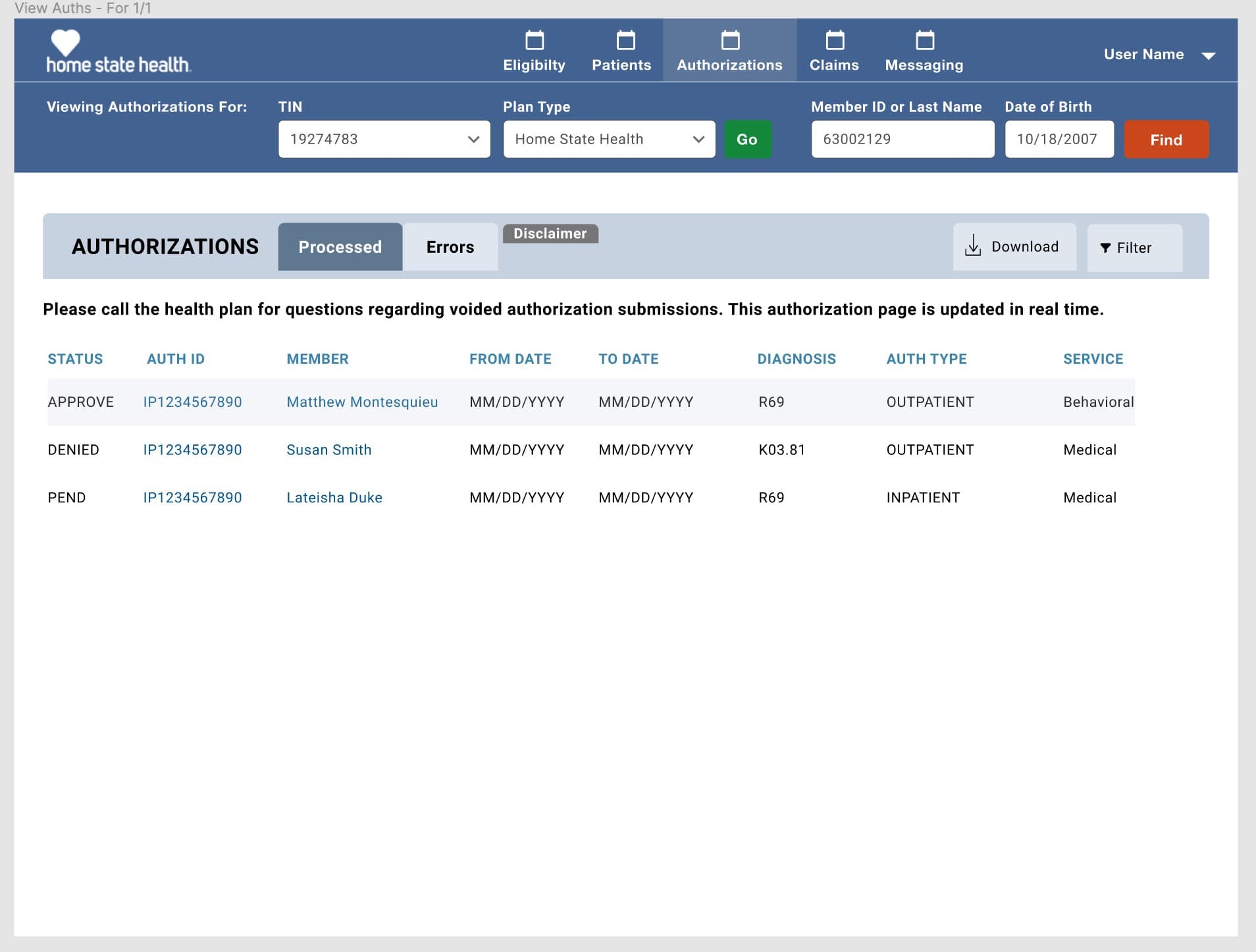
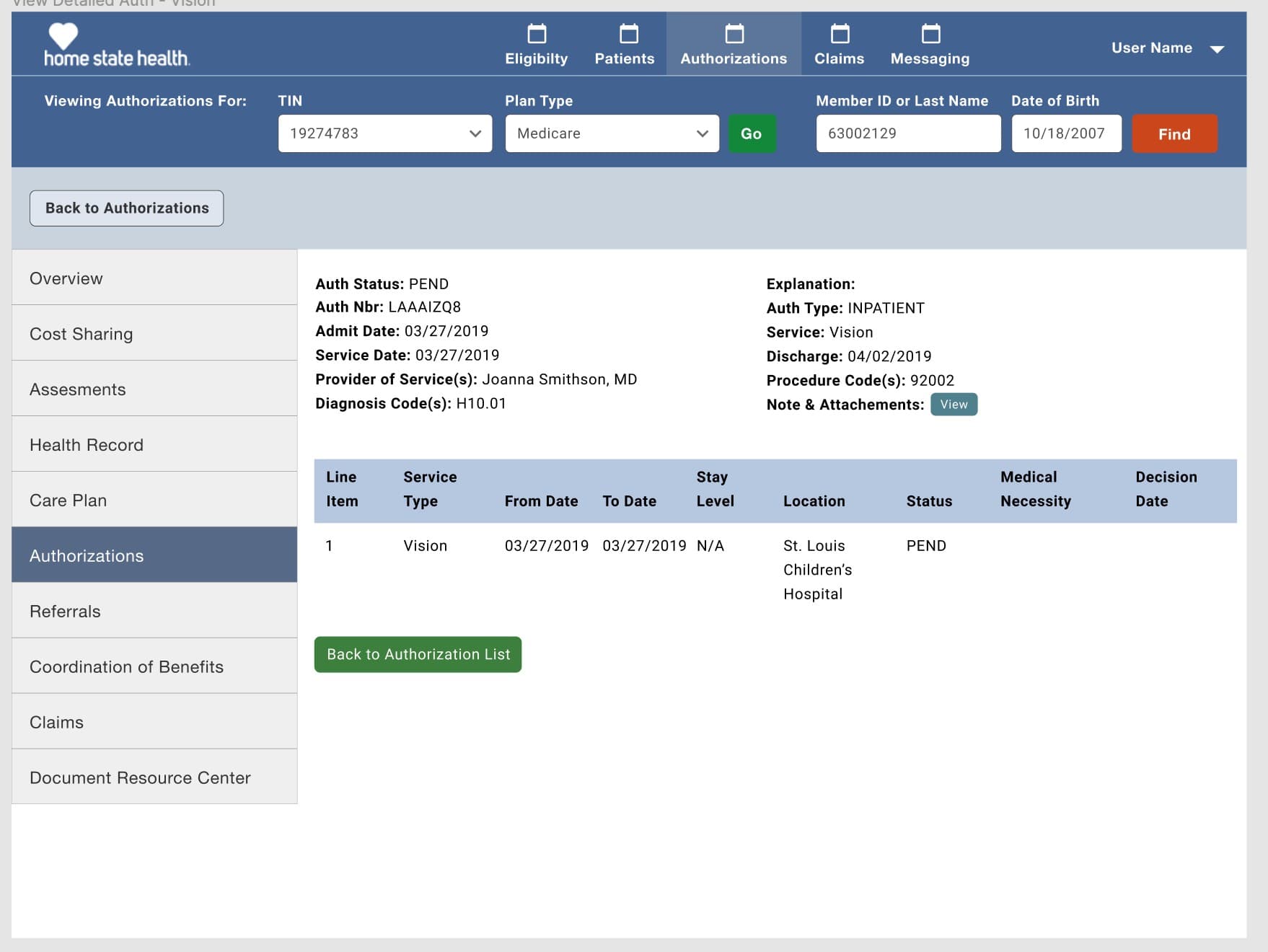
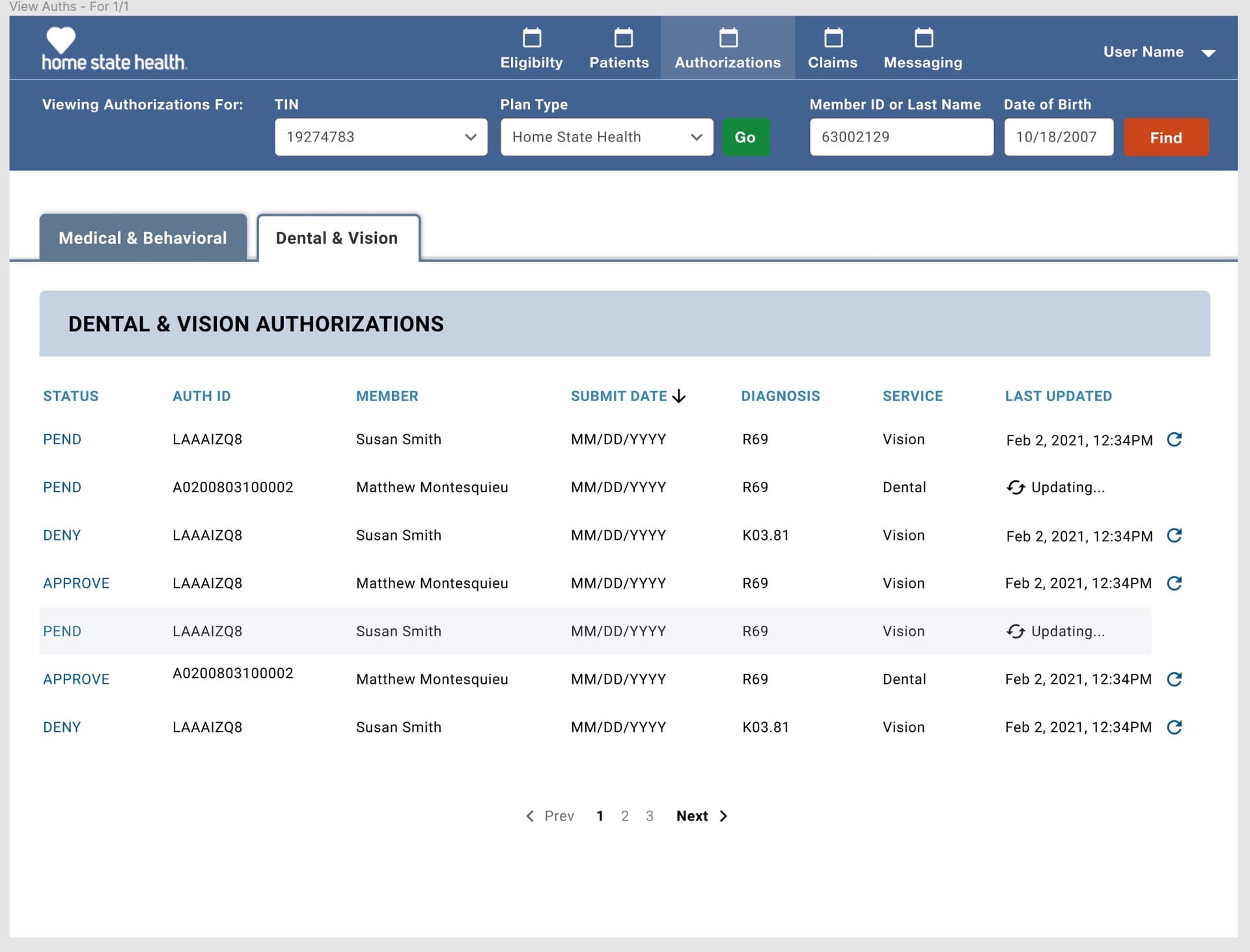
What shipped. What changed.
What shipped in the iterations I worked on: a mid-to-hi-fidelity Figma prototype of the Appeals and Grievances module inside the Home State Health Provider Portal, wireframes and swim-lane blueprints for both the Appeal and Complaint intake flows, epic-planning boards for three workstreams (Appeals, Claims, MCG), and an agreed integration contract for how Provider Portal, Prime, TruCare, and MCG would exchange records and statuses. The design replaced a ten-to-fourteen-day paper and EDI process with a digital submission where the provider gets an Appeal ID and status the moment Prime accepts the record, and where the coordinator sees new appeals in a queue rather than a fax tray.
I don't have hard post-launch numbers to report. My engagement ended before the module hit production, and I wasn't the one measuring it. What I can say: the product review with Gary Wu, Flavia Baciu, and Pawan Chadha approved the design, the epics were sized and moved into build, and the flow was documented well enough that the engineering team could implement it without reverse-engineering intent from screens.
“The thing I keep coming back to on this one: healthcare workflow design is 80% understanding the system boundaries and 20% drawing screens. If I had started in Sketch on day one, I would have built a beautiful form that quietly created data-integrity bugs the moment two people touched the same appeal. What I got right was refusing to design the interface until the swim lane was clean. What I got wrong the first time was underestimating how different the complaints and grievances object was from an appeal — I tried to unify them and had to back it out. And the honest limit of this case study: I was a designer, not the product owner, so I can't tell you how much SLA time came out of the process post-launch. What I can tell you is what a good workflow looks like when four regulated systems have to agree on the same record.”
NielsenIQ OmniData BI — Data Selector
A 336px side panel that lets retail analysts compose Nielsen syndicated queries without writing SQL.